Overview
This document details how to view a prospect in the Donor & Alumni Relationship Tool (DART).
You must have the DART Development View role to perform this task. For more information about roles and security, refer to the DART Training Courses page on the DART Education and Training website.
Important Information
- All prospects in DART are called major giving prospects regardless of their ratings or giving history.
- To view a prospect, you must Search for a Prospect.
Prospect Summary
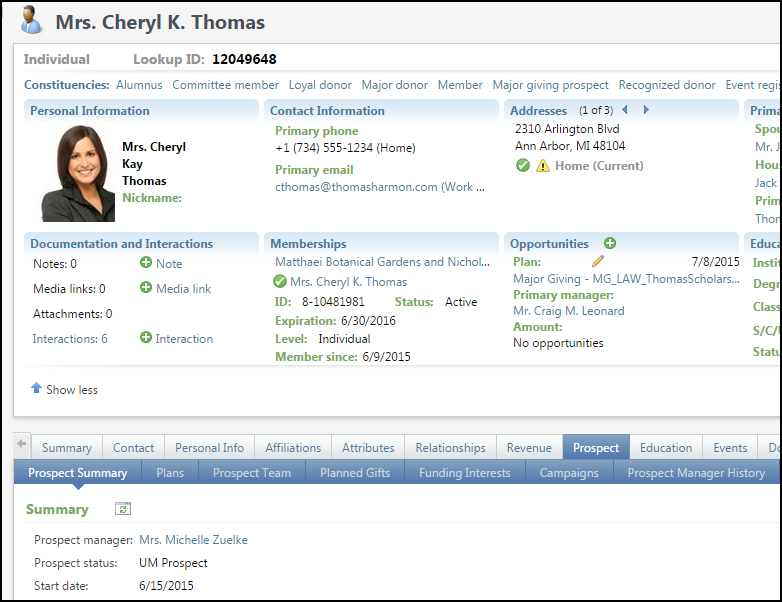
The Prospect Summary tab provides a quick overview of the prospect including Prospect Manager, Prospect Status, and Start Date.
| Field/Button | Description |
|---|---|
| Prospect Manager | The lead person assigned to managing the relationship with the prospect. Note: If a Prospect Manager was removed and was not replaced, the name of the last Prospect Manager continues to appear on the prospect banner (top of the page) due to a bug in DART. The individual was removed as the PM but because there is not a replacement he/she still appears in the banner. |
| Start Date | The date the prospect manager was assigned to the prospect. |
| Prospect Status | The classification of a prospect such as U-M Prospect or Inactive. |
Plans Tab
The Plans tab displays a list of all active plans for a prospect.
Notes:
- A list of all active plans for a prospect appears by default. To include historical plans, select Include historical plans in the filter area and click Apply.
- For information on viewing a specific plan, steps, and opportunities, see View a Prospect Plan

| Field/Button | Description |
|---|---|
| Plan type | The classification of a plan as major giving, lead annual giving, planned giving, etc. |
| Plan name | The name given to a plan. |
| Start Date | The date a plan began. |
| Date added | The date a plan was entered into DART. |
| Sites | Indicates the school, college, or unit to which a plan is tied. |
Prospect Team Tab
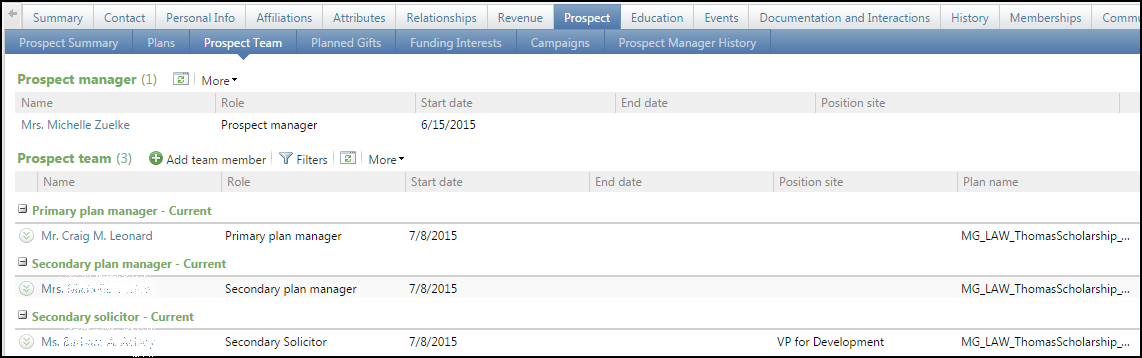
The Prospect Team tab displays a list of all individuals working with a prospect.
| Field/Button | Description |
|---|---|
| Role | Indicates the relationship to a prospect such as Prospect Manager, Plan Manager, or Secondary Plan Manager. |
| Start date | The date an individual was assigned to a prospect or a plan. |
| End date | The date an individual ended an assignment to a prospect or a plan. |
| Position site | The physical worksite of the individual. |
| Plan name | Indicates the name of the plan to which an individual is assigned. |
Planned Gifts Tab
The Planned Gifts tab displays a prospect’s gift records created by gift planning.

| Field/Button | Description |
|---|---|
| Date | The date a planned gift was entered into DART. |
| Status | Indicates the status of a planned gift such as proposal, accepted, rejected, withdrawn, etc. |
| Vehicle | Indicates the planned giving vehicle such as bequest, charitable gift annuity, life insurance, etc. |
| Amount | The value of a planned gift upon maturity. |
| Balance | The current balance of a planned gift. |
| Payments | Any amount paid towards the gift. |
| Sites | The schools, colleges, or units for which the gift is intended. |
| Campaigns | Group fundraising campaigns associated with the gift. |
Funding Interests Tab
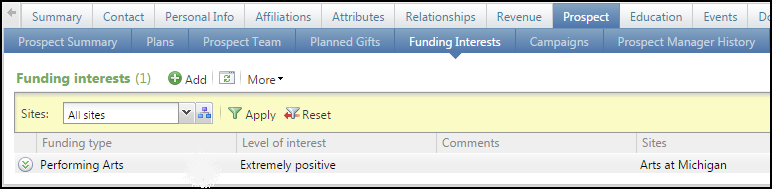
The Funding Interests tab displays a list of areas of U-M that a prospect may desire to support with a gift.
| Field/Button | Description |
|---|---|
| Funding type | Indicates the type of funding a prospect is interested in, such as fellowships, scholarships, or capital projects. |
| Level of interest | An estimate of a prospect’s interest level ranging from extremely positive to extremely negative. |
| Sites | The schools, colleges, or units to which a prospect is interested in giving. |
Campaigns Tab
The Campaigns tab displays information regarding opportunities that are linked to a specific campaign..

Prospect Manager History Tab
The Prospect Manager History tab displays a history of all individuals who have managed the prospect, including their start and end dates.
